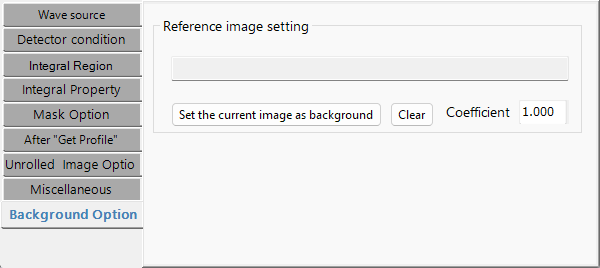
螢幕截圖為英文
IPAnalyzer 的介面目前僅在地化為英文與日文,因此本頁的螢幕截圖以英文顯示,即使內文已翻譯。
Property Windows
屬性視窗用於設定波源、偵測器條件以及各種一維化條件。每個分頁也可從主視窗的 Property 選單直接開啟。
本視窗的介面為英文。下面的標題採用實際的分頁名稱與控制項名稱。
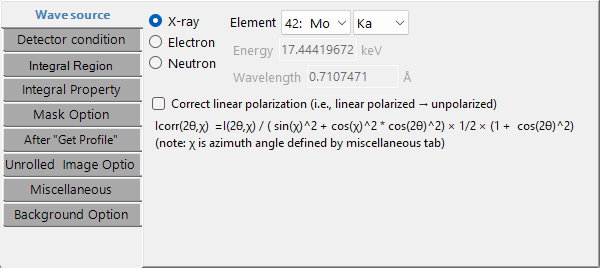
Wave source
設定入射束的類型與波長。波源可以是 X 射線、電子或中子。對於 X 射線,選擇一個元素和一個躍遷(K line、L line 等)會自動填入波長;對於同步輻射,請直接輸入波長。對於電子束與中子束,請輸入能量或波長(電子波長經過相對論修正)。
- Correct linear polarization:將線偏振強度修正為非偏振等效值(用於同步輻射資料)。下面的修正公式取決於方位角 χ(在 Miscellaneous 分頁上定義)與散射角 2θ。
\[
I_\text{corr}(2\theta,\chi) = \frac{I(2\theta,\chi)}{\sin^2\chi + \cos^2\chi\,\cos^2 2\theta} \times \frac{1}{2}\left(1 + \cos^2 2\theta\right)
\]
Detector condition
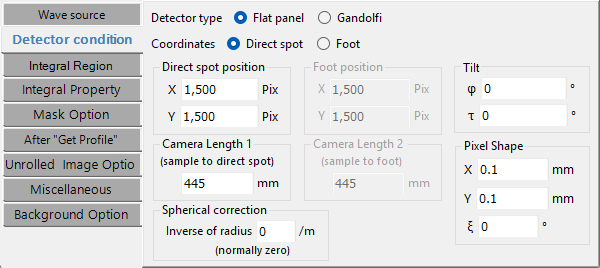
設定偵測器的幾何條件。這對應於舊版的 "IP Condition",並增加了座標系與偵測器形狀的選擇器。
- Coordinates:Direct spot(直射斑參考) / Foot(垂足參考)。
- Detector type:Flat panel / Gandolfi。
- Direct spot position 與 Camera Length 1:直射斑位置(X、Y pix)以及從樣品到直射斑的距離(mm)。
- Foot position 與 Camera Length 2:在 Foot 模式下,垂足的位置以及從樣品到垂足的距離。
- Pixel Shape:像素尺寸 X、Y(mm)以及 ξ(Ksi,平行四邊形傾斜角)。
- Gandolfi Radius:當選擇 Gandolfi 形狀時的半徑。
- Spherical correction:球面修正(通常為零)。
- Tilt:IP 傾斜 φ(Phi)與 τ(Tau)。
關於傾斜 φ、τ 與像素 ξ 的定義,請參閱 概觀。
Integral Region
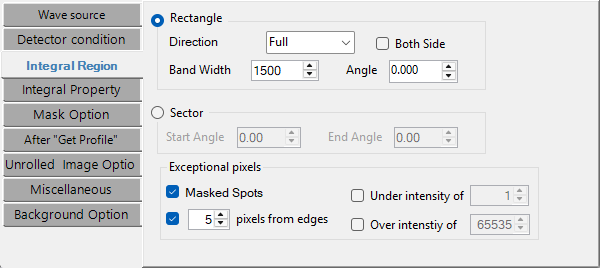
指定要進行一維化的影像區域。
- Rectangle:選擇 Direction(Full / Top / Bottom / Left / Right / Vertical / Horizontal / Free),並設定 Band Width、Angle(在 Free 模式下)以及 Both Side。
- Sector:用 Start Angle / End Angle 指定角度範圍。
- Exceptional pixels:排除 Masked Spots、強度 Under intensity of / Over intensity of 給定閾值的像素,以及距邊緣若干 pixels from edges 的像素。
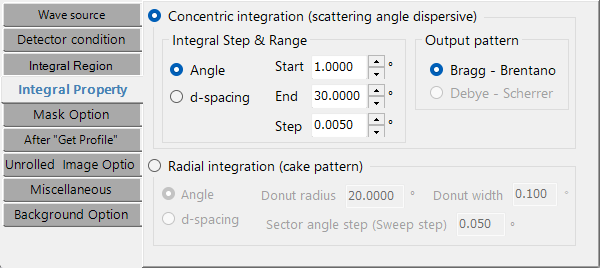
Integral Property
設定積分方法與步長。
- Concentric integration (scattering-angle dispersive):從 Angle(2θ,°) / Length(mm) / d-spacing(Å)中選擇橫軸單位,並設定 Start / End / Step。Output pattern 可以是 Bragg - Brentano 或 Debye - Scherrer。
- Radial integration (cake pattern):沿方位角方向分析環形區域。從 Angle / d-spacing 中選擇橫軸,並設定 Donut radius(中心半徑)、Donut width(環寬)以及 Sector angle step(掃描步長)。
Mask Option
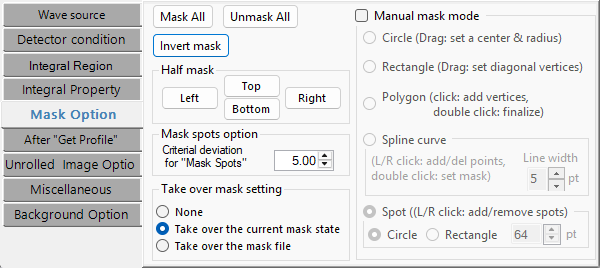
設定遮罩以及中心/斑點偵測的條件(舊版 "Find Center & Spots" 的擴充)。
- Half mask:用於快速遮蔽影像上半、下半、左半或右半的按鈕。
- Manual mask mode:在主影像上啟用互動式遮罩。形狀有 Circle(拖曳以設定中心與半徑)、Polygon(點擊以新增頂點)、Rectangle(拖曳對角頂點)、Spline curve 以及 Spot(左鍵/右鍵點擊以新增/移除斑點)。
- Takeover:載入新影像時如何處理遮罩(None / Take over the current mask state / Take over the mask file)。
- Find Spots → Deviation:斑點偵測的統計閾值。
- Find Center:中心偵測的搜尋範圍,等等。
After "Get Profile"
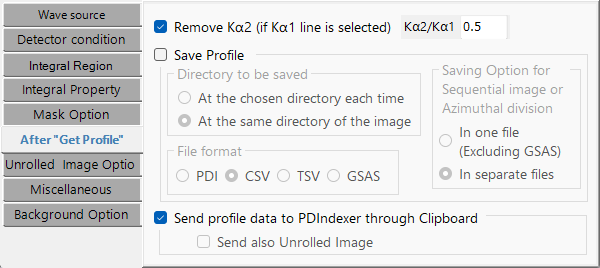
設定一維化之後的儲存與傳送。
- Save File:選擇目標位置(「與影像相同的資料夾」或「每次選擇的資料夾」)以及格式 PDI / CSV / TSV / GSAS。
- Send PDIndexer:透過剪貼簿將曲線傳送到正在執行的 PDIndexer 實例。
Unrolled Image Option
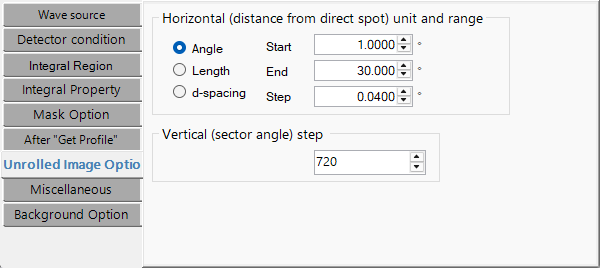
設定展開(Unroll)影像的參數。
- Horizontal:單位(Angle / Length / d-spacing)以及 Start / End / Step。輸出影像寬度 ≈ (End − Start) / Step。
- Vertical:方位角步長(°/pixel)。輸出影像高度 ≈ 360 / step。
展開會將以直射斑為中心的極座標繞射影像映射為直角座標(角度對距離)影像。
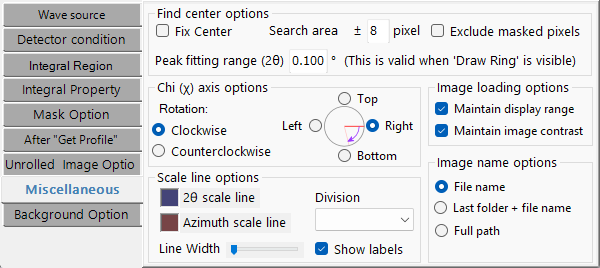
Miscellaneous
彙集較細的顯示與座標設定的分頁。
- Image name display:僅檔名 / 上層資料夾 + 檔名 / 完整路徑。
- Contrast / intensity-range persistence:載入新影像時是否沿用顯示設定。
- Azimuth χ (Chi) orientation:參考位置(Top / Bottom / Left / Right)以及旋轉方向(Clockwise / Counterclockwise)。χ 被偏振修正與徑向積分所引用。
- Scale line:顏色、寬度、分度數以及標籤顯示。
- Find Center:搜尋範圍、峰擬合範圍、固定中心,以及排除遮蔽像素。
Background Option
設定以背景影像進行的修正。
- Background image:將目前顯示的影像設為背景(Set the current image as background),或清除它(Clear)。
- Coefficient:施加到背景影像上的係數。
- Edge mask:在修正時於邊緣施加的額外遮罩邊界(px)。
用於平場修正、去除空氣散射等。