Property Windows
The property window is where you configure the source, the detector conditions, and the various one-dimensionalization conditions. Each tab can also be opened directly from the Property menu in the main window.
The UI of this window is in English. The headings below use the actual tab and control names.
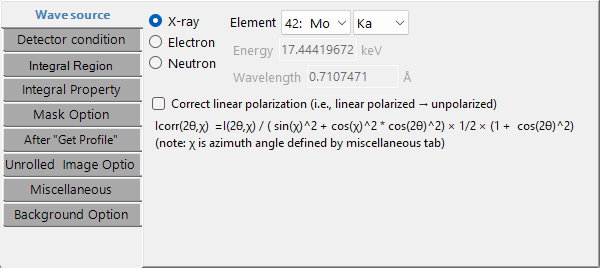
Wave source
Sets the type of incident beam and the wavelength. The source can be X-ray, electron, or neutron. For X-rays, selecting an element and a transition (K line, L line, etc.) fills in the wavelength automatically; for synchrotron radiation, enter the wavelength directly. For electron and neutron beams, enter the energy or the wavelength (the electron wavelength is relativistically corrected).
- Correct linear polarization: corrects a linearly-polarized intensity to the unpolarized equivalent (for synchrotron data). The correction formula below depends on the azimuth χ (defined on the Miscellaneous tab) and the scattering angle 2θ.
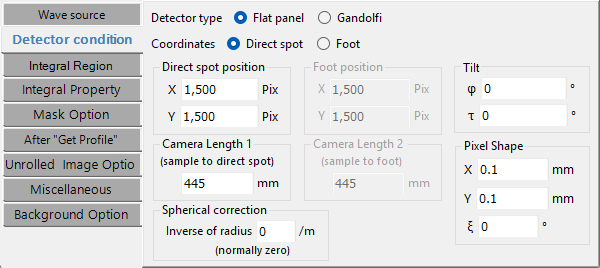
Detector condition
Sets the geometric conditions of the detector. This corresponds to the legacy "IP Condition", with the addition of coordinate-system and detector-shape selectors.
- Coordinates: Direct spot (direct-spot reference) / Foot (foot-of-perpendicular reference).
- Detector type: Flat panel / Gandolfi.
- Direct spot position and Camera Length 1: the direct-spot position (X, Y pix) and the distance from the sample to the direct spot (mm).
- Foot position and Camera Length 2: in Foot mode, the position of the foot of the perpendicular and the distance from the sample to the foot.
- Pixel Shape: pixel size X, Y (mm) and ξ (Ksi, the parallelogram skew angle).
- Gandolfi Radius: the radius, when the Gandolfi shape is selected.
- Spherical correction: spherical correction (normally zero).
- Tilt: the IP tilt φ (Phi) and τ (Tau).
See Overview for the definitions of the tilt φ, τ and the pixel ξ.
Integral Region
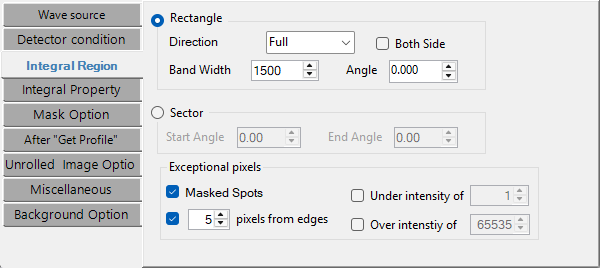
Specifies the image region to be one-dimensionalized.
- Rectangle: choose the Direction (Full / Top / Bottom / Left / Right / Vertical / Horizontal / Free), and set the Band Width, the Angle (in Free mode), and Both Side.
- Sector: specify the angular range with Start Angle / End Angle.
- Exceptional pixels: exclude Masked Spots, pixels Under intensity of / Over intensity of the given thresholds, and a number of pixels from edges.
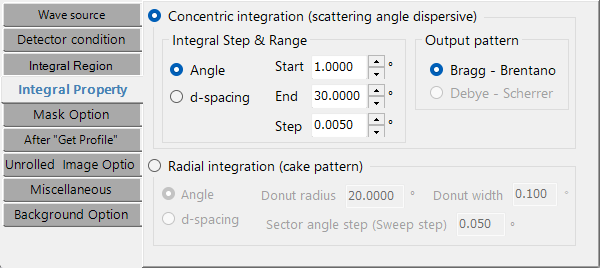
Integral Property
Sets the integration method and step.
- Concentric integration (scattering-angle dispersive): choose the horizontal-axis unit from Angle (2θ, °) / Length (mm) / d-spacing (Å), and set Start / End / Step. The Output pattern can be Bragg - Brentano or Debye - Scherrer.
- Radial integration (cake pattern): analyzes a ring-shaped region in the azimuthal direction. Choose the horizontal axis from Angle / d-spacing, and set the Donut radius (central radius), Donut width (annulus width), and Sector angle step (sweep step).
Mask Option
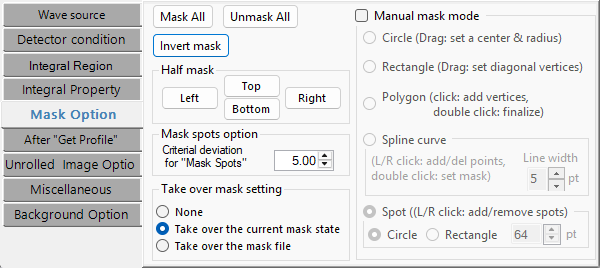
Sets the conditions for masking and for center/spot detection (an expansion of the legacy "Find Center & Spots").
- Half mask: buttons that quickly mask the top, bottom, left, or right half of the image.
- Manual mask mode: enables interactive masking on the main image. The shapes are Circle (drag to set center and radius), Polygon (click to add vertices), Rectangle (drag diagonal vertices), Spline curve, and Spot (left/right click to add/remove spots).
- Takeover: how the mask is treated when a new image is loaded (None / Take over the current mask state / Take over the mask file).
- Find Spots → Deviation: the statistical threshold for spot detection.
- Find Center: the search range for center detection, and so on.
After "Get Profile"
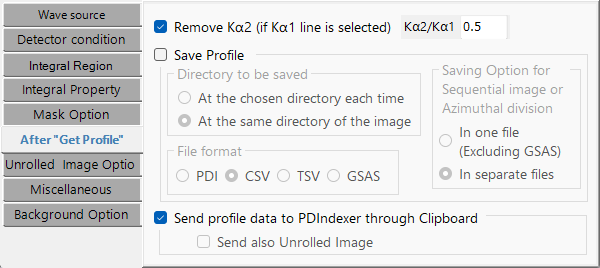
Sets saving and sending after one-dimensionalization.
- Save File: choose the destination ("the same directory as the image" or "a directory chosen each time") and the format from PDI / CSV / TSV / GSAS.
- Send PDIndexer: sends the profile, via the clipboard, to a running instance of PDIndexer.
Unrolled Image Option
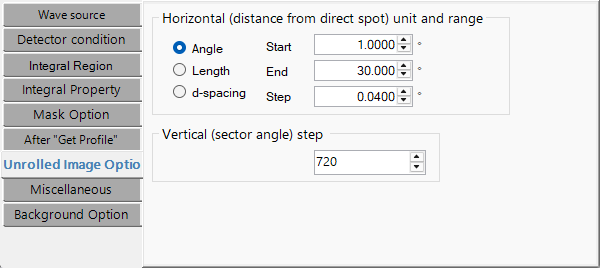
Sets the parameters for the unrolled (Unroll) image.
- Horizontal: the unit (Angle / Length / d-spacing) and Start / End / Step. The output image width ≈ (End − Start) / Step.
- Vertical: the azimuthal step (°/pixel). The output image height ≈ 360 / step.
Unrolling maps the polar diffraction image centered on the direct spot into a Cartesian (angle vs. distance) image.
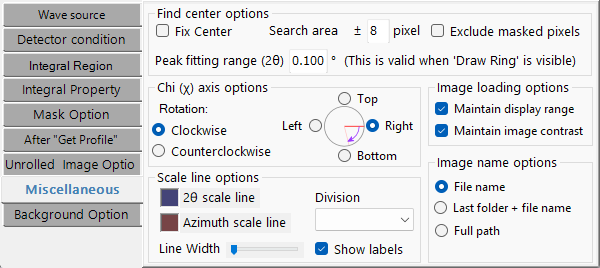
Miscellaneous
A tab that collects the finer display and coordinate settings.
- Image name display: filename only / parent folder + filename / full path.
- Contrast / intensity-range persistence: whether display settings carry over when a new image is loaded.
- Azimuth χ (Chi) orientation: the reference position (Top / Bottom / Left / Right) and the rotation sense (Clockwise / Counterclockwise). χ is referenced by the polarization correction and the radial integration.
- Scale line: color, width, number of divisions, and label display.
- Find Center: search range, peak-fitting range, fix center, and exclude masked pixels.
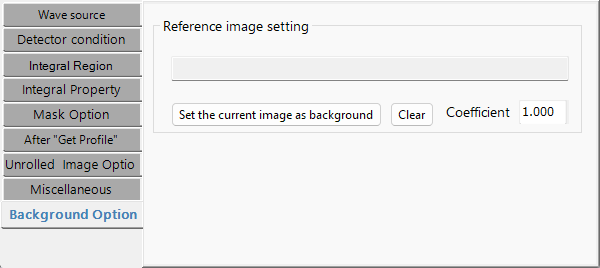
Background Option
Sets correction by a background image.
- Background image: set the currently displayed image as the background (Set the current image as background), or clear it (Clear).
- Coefficient: the factor applied to the background image.
- Edge mask: an additional mask margin (px) applied at the edges during correction.
Used for flat-field correction, removal of air scattering, and similar.