Appendix A3. Image integration
When converting a 2D image into a 1D profile, the biggest problem is how to distribute the intensity of a pixel that straddles several steps when the angular step size of the integration is smaller than the pixel spacing (pixel size). IPAnalyzer handles this distribution with an area-based distribution method.
Area-based distribution method
In this software, the program computes the intersections between the lines that delimit each step (the boundaries of equal diffraction angle) and the pixels, obtains the area of each pixel that falls within a given step, and distributes the intensity in proportion to that area.
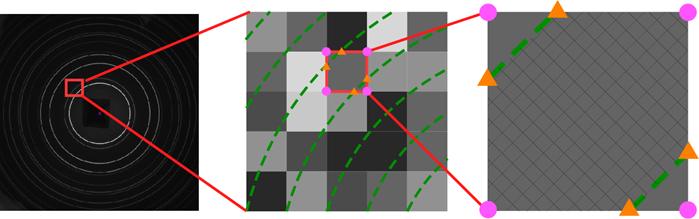
This method has the following characteristics.
- Inside each pixel, the arc of the step boundary is approximated as a straight line. This is done for computational speed and is almost never a problem in practice.
- When the tilt correction and pixel-shape correction in A1. Detector geometry are required, the pixel shape is not strictly square. The software therefore computes the coordinates of the four corners of the pixel sequentially and obtains the area as a quadrilateral (in general, a parallelogram).
With this scheme, in principle, no matter how fine the angular step is made, the pixel intensity is distributed smoothly across the steps.
Scope of application
The same area-based distribution algorithm is used for all three of the following types of integration.
| Function | Direction of integration | Use |
|---|---|---|
| Concentric Integration | Diffraction angle (concentric direction) | Creating an ordinary \(2\theta\)-intensity profile. |
| Radial Integration | Circumferential (azimuthal) direction | Evaluating the azimuthal dependence of a ring (orientation, distortion). |
| Unrolled Image | Diffraction angle × azimuth | Creating a 2D unrolled image with the ring cut open. |
For how to operate each function, see 3. Tools.